
Procurement Planning Software | Budget Control | APSentra
Aps entra

Procurement planning software with preventive budget control

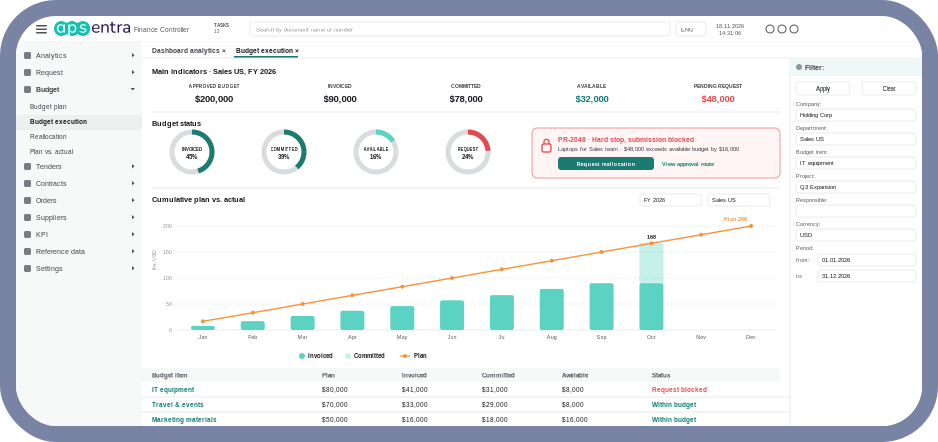
APSentra connects the procurement plan and budgets, and checks every purchase request against approved budget and committed spend before approval. Overruns stop at the request, not in the monthly report.
Sales US · FY 2026 budget
$200,000
Updated in real time
InvoicedCommitted (approved POs)Available
$90,000Invoiced
$78,000Committed, not yet invoiced
$32,000Truly available for new requests

Illustrative example

See preventive budget control in under a minute

0:56
  • 1Each request is checked against budget, committed spend, and cost center the moment it is created.
  • 2A request that exceeds the available budget hits a hard stop before approval.
  • 3Reallocation runs through a governed approval, and finance sees the result in real time.

From reactive tracking to preventive control

Reactive budget tracking
  • Budgets tracked in spreadsheets
  • Spend visible only after invoices post
  • Approvals without budget context
  • Overruns explained after the fact
APSentra
  • Budgets enforced in every workflow
  • Commitments tracked from approval
  • Budget checked before approval
  • Overruns stopped at the request
Budget control must happen before money is committed.
Aps entra Aps entra

Core capabilities

Approval bottlenecks that slow the business icon

Budget validation at the request

Every request is checked against cost center, project, and entity budgets before it reaches an approver. Requests over the available budget hit a hard stop.
Purchasing leverage lost as spend fragments icon

Committed spend tracking

Commitments are recorded at request and purchase order approval, so invoiced, committed, and available amounts stay current for every budget line.
End-to-end P2P visibility icon

Governed budget reallocation

Reallocation between cost centers, projects, and entities follows its own approval route, and every adjustment is recorded in the audit trail.
Consolidated reporting at any scale icon

Plan vs. actual visibility

Live dashboards by cost center, project, and category, with variance analysis across periods and a consolidated view across legal entities.
Layers icon

A budget structure that mirrors your organization

The digital twin of your organization models budgets on departments, projects, cost centers, and entities. Client admins adjust budgets, roles, and routes without an integrator.
Intercompany procurement tracking icon

Multi-entity budget control

Each legal entity runs its own budgets and approval rules, while group finance sees a consolidated plan vs. actual across all of them.
Selection — AI procurement

Purchases checked against the plan

Every purchase is controlled against the approved procurement plan, with planned and unplanned purchases tracked separately.
Competitive tendering: RFQ, RFP, and reverse auction icon

Funds reserved per plan item

Each plan item reserves its own funds, so actuals, reserves, and remaining amounts stay visible by company, period, plan, and project.
Send money — AI procurement

Requests linked to budget lines

Request items link to budget plan lines one by one or in bulk, so every purchase carries its budget context from the start.
Aps entra Aps entra

What changes for finance

Temporary lock icon

No unapproved commitments

Every purchase is validated against the budget before money is committed.
Negotiating without performance data icon

Forecasts built on commitments

Finance sees future liabilities before invoices arrive.
Task icon

Audit-ready budget history

Every check, block, and reallocation is recorded with who approved it.

Try the budget check. Push the request over the limit.

Move the slider to change the request amount. APSentra checks it against invoiced and committed spend before it ever reaches an approver.

New purchase request
$48,000
$2,000$70,000
Item: Laptops for Sales team
Cost center: Sales US
Project: Q3 Expansion
Sales US · FY 2026 budget$200,000
Invoiced $90,000Committed $78,000Available $32,000

Illustrative example

Budget control is a question of timing.

Most organizations check budgets at month end, after money is committed. APSentra checks at the first step, while a decision can still change. See how real-time budget control works in practice.

Request
Approval
Purchase order
Goods receipt
Invoice
Month-end report
Typical setup
Budget checked here, after the money is committed
APSentra
Budget checked here, before anyone approves

Why reactive budget tracking falls behind

Request

Budget check at creation

Before
  • Request emailed, budget checked later
After
  • Checked against cost center, project, and entity at creation
Over budget

Hard stop

Before
  • Overrun discovered in the monthly report
After
  • Submission blocked before approval
Commitments

Committed spend tracking

Before
  • Only invoiced spend is visible
After
  • Approved purchase orders count against the budget immediately
Reallocation

Governed reallocation

Before
  • Budget moved by email, with no record
After
  • Approved reallocation with an audit trail
Reporting

Live plan vs. actual

Before
  • Spreadsheet exports at month end
After
  • Live view by cost center, project, and entity
Multi-entity

Consolidated control

Before
  • A separate budget file for each entity
After
  • One budget structure with group-level visibility

High-speed implementation

Go live in 8 weeks
Aps entra
Aps entra Aps entra
1 Week
Consulting
Review existing business processes, define goals, KPIs, and savings potential.
Aps entra
Aps entra Aps entra
3 Weeks
Implementation & Automation
Configure APSentra, launch workflows, and begin tracking key procurement KPIs.
Aps entra
Aps entra Aps entra
3 Weeks
Integration
Integrate APSentra with your ERP, accounting, and analytics systems to ensure seamless data flow.
Aps entra
Aps entra Aps entra
1 Week
Learning
Turn procurement into a growth lever through certified courses and practical use cases.
Aps entra
Aps entra Aps entra
Ongoing
Control & Optimization
Monitor performance, ensure processes run smoothly – optimize where needed.
Aps entra Aps entra

Connected across the source-to-pay cycle

Selection — AI procurement

Intake & Request Management

Every request enters through one structured front door, with the budget check built in.
Competitive tendering: RFQ, RFP, and reverse auction icon

Strategic Sourcing

Sourcing events are tied to planned demand and approved budgets.
Send money — AI procurement

Procure-to-Pay Automation

Purchase orders and invoices update committed and actual spend automatically.
Budgeting — AI procurement

Business Spend Management

Spend analytics share the same budget structure and cost classification.
Expired certifications creating compliance exposure icon

Contract Lifecycle Management

Negotiated contract terms flow into purchase orders, so committed spend reflects agreed rates.
Supplier management, digital tendering and sourcing icon

Supplier Management

Approved suppliers and their records are shared across requests, budgets, and purchase orders.
Aps entra Aps entra

See APSentra budget control in action

Bring one of your cost centers and see how budget checks, hard stops, and reallocation would run on your own structure.
FAQs

01.

What is procurement planning software?

Procurement planning software connects purchasing with the approved budget. It records budgets by cost center, project, and entity, checks each purchase request against them, and tracks spend from commitment to payment. APSentra runs this inside the same platform as sourcing, contracts, and procure-to-pay.

02.

How does preventive budget control work?

When someone creates a purchase request, APSentra compares its amount with the available budget for that cost center, project, and entity. Available budget already excludes invoiced and committed spend. If the request fits, it moves to approval; if it does not, it stops.

03.

What is the difference between committed and actual spend?

Committed spend is money promised through approved requests and purchase orders that are not yet invoiced. Actual spend is what has been invoiced or paid. Tracking both shows finance the real remaining budget, not only what has already left the account.

04.

What happens when a request exceeds the available budget?

APSentra blocks the submission before it reaches an approver. The budget owner can then request a reallocation from another cost center or project. That request follows its own approval route and is recorded in the audit trail.

05.

Can APSentra manage budgets across multiple entities and projects?

Yes. Each legal entity, department, and project can hold its own budget and approval rules. Group finance sees a consolidated plan vs. actual view across all of them.

06.

Does procurement planning software integrate with our ERP?

Yes. APSentra is ERP-agnostic and integrates with SAP, SAP Business One, NetSuite, Dynamics 365 Business Central, Dynamics NAV, Odoo, and QuickBooks, plus Microsoft Power BI and an open API for custom systems.

07.

How long does implementation take?

Most clients go live within 8 weeks, covering consulting, configuration, and ERP integration. Timing depends on the number of entities, integrations, and modules activated at once.

08.

How does APSentra handle unplanned purchases?

Purchases are controlled against the approved procurement plan. Unplanned purchases are tracked separately from planned ones, so finance sees exactly how much spend falls outside the plan and why.