
Spend Management Software | Spend Control | APSentra
Aps entra

Spend management software that keeps spend inside plan, budget, and contract

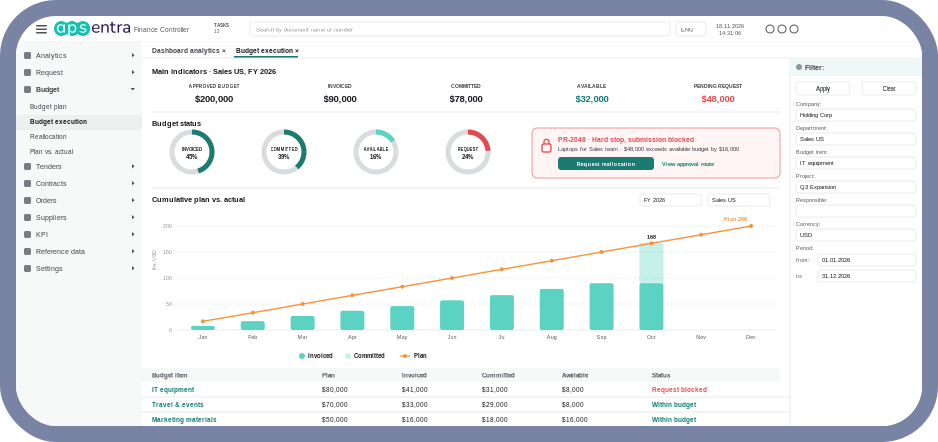
APSentra shows actual, committed, and remaining spend for every budget line, separates planned from unplanned purchases, and traces each order to the request, tender, or contract behind it, across every entity.

See where spend sits against plan, contract, and supplier

Click through spend control in APSentra: budget lines, plan vs. actual, unplanned purchases, spend by order source, and supplier concentration, in three steps.

Interactive walkthrough with illustrative data. Budget structures, reports, and approval routes are configured for each organization.

From after-the-fact reports to spend under control

Spend reviewed after the fact
  • Spend seen only after invoices post
  • Unplanned purchases mixed into totals
  • Contract coverage unknown
  • Single-supplier categories found by chance
APSentra
  • Actual, committed, and remaining per budget line
  • Unplanned purchases reported separately
  • Every order traced to its source document
  • Supplier concentration by category
You can only manage spend you can see before it happens.
Aps entra Aps entra

Core capabilities

Approval bottlenecks that slow the business icon

Actual, committed, and remaining

Every budget line shows actual spend, reserves, and the remaining amount, by company, period, plan, and project.
Purchasing leverage lost as spend fragments icon

Hard stop at the request

Requests that exceed the remaining budget are blocked before any commitment is made.
End-to-end P2P visibility icon

Planned vs. unplanned purchases

Purchases are controlled against the approved procurement plan, and unplanned ones are tracked separately.
Consolidated reporting at any scale icon

Emergency purchases on their own route

Emergency requisitions follow dedicated approval routes and stay visible in reporting.
Layers icon

Every order traced to its source

Each order records the request, tender, or contract it came from, so contract and tender coverage is clear.
Intercompany procurement tracking icon

Prices held to the contract

Suppliers cannot change prices on orders created from a tender or a specification.
Selection — AI procurement

Blocked suppliers kept out

With the access rule on, blocked suppliers cannot be used in requests, tenders, contracts, or orders.
Competitive tendering: RFQ, RFP, and reverse auction icon

Turnover and supplier concentration

The data cube shows turnover by supplier and category, so single-supplier categories stand out.
Send money — AI procurement

One view across entities

Dashboards filter by company, department, budget item, category, and supplier, from the same data model.
Aps entra Aps entra

What changes for finance, procurement, and budget owners

Temporary lock icon

Commitments before invoices

Spend is recorded against the budget at the request and order stage, not when the invoice posts.
Negotiating without performance data icon

Leverage you can see

Direct orders and single-supplier categories show where the next tender will pay off.
Task icon

Unplanned spend with a reason

Every unplanned or emergency purchase carries its approval route and approvers.

High-speed implementation

Go live in 8 weeks
Aps entra
Aps entra Aps entra
1 Week
Consulting
Review existing business processes, define goals, KPIs, and savings potential.
Aps entra
Aps entra Aps entra
3 Weeks
Implementation & Automation
Configure APSentra, launch workflows, and begin tracking key procurement KPIs.
Aps entra
Aps entra Aps entra
3 Weeks
Integration
Integrate APSentra with your ERP, accounting, and analytics systems to ensure seamless data flow.
Aps entra
Aps entra Aps entra
1 Week
Learning
Turn procurement into a growth lever through certified courses and practical use cases.
Aps entra
Aps entra Aps entra
Ongoing
Control & Optimization
Monitor performance, ensure processes run smoothly – optimize where needed.

Why spend reports arrive too late

Visibility

Before the invoice

Before
  • Spend seen after invoices post
After
  • Commitments recorded at request and order
Budget

Stopped at the request

Before
  • Overruns explained at month end
After
  • Hard stop when a request exceeds the budget
Plan

Unplanned in its own column

Before
  • Unplanned purchases hidden in totals
After
  • Planned and unplanned reported separately
Contracts

Traced to the source

Before
  • Contract coverage estimated
After
  • Every order linked to its request, tender, or contract
Suppliers

Concentration in view

Before
  • Single-supplier categories found by chance
After
  • Turnover share by supplier for every category
Entities

Group and entity views

Before
  • Separate spreadsheets for each entity
After
  • One model filtered by company in one click
Aps entra Aps entra

Connected across the source-to-pay cycle

Selection — AI procurement

Procurement Planning & Budget Control

Budget lines, reserves, and the hard stop behind every spend figure.
Competitive tendering: RFQ, RFP, and reverse auction icon

Intake & Request Management

Spend starts as an approved request with a budget item and entity.
Send money — AI procurement

Strategic Sourcing

Direct orders and single-supplier categories become candidates for the next tender.
Budgeting — AI procurement

Contract Lifecycle Management

Orders from contracts follow the agreed prices and volumes.
Expired certifications creating compliance exposure icon

Supplier Management

Supplier status and scores sit next to their share of spend.
Supplier management, digital tendering and sourcing icon

Procurement Analytics

The data cube, price dynamics, and bid reports behind every spend figure.
Aps entra Aps entra

Keep spend inside plan, budget, and contract

Book a demo to see budget lines, unplanned purchases, and spend by source configured for your own entities.
FAQs

01.

What is spend management software?

Spend management software tracks and controls company spending across budgets, departments, suppliers, and categories, so organizations can see and steer spend before money is committed, not only after it is paid.

02.

How does APSentra control spend before it happens?

Every request is checked against the remaining budget, and requests that exceed it hit a hard stop. Approved requests and orders are recorded as commitments, so the budget position stays current.

03.

How are unplanned purchases handled?

Purchases are controlled against the approved procurement plan. Unplanned and emergency purchases follow their own approval routes and are reported separately from planned spend.

04.

What is maverick spend, and how does APSentra reduce it?

Maverick spend is purchasing outside approved processes, suppliers, or contracts. APSentra reduces it structurally: budget checks at the request, separate tracking of unplanned purchases, prices locked to contracts, and blocked suppliers kept out of new purchases.

05.

Can we see how much spend runs through contracts?

Yes. Every order records the request, tender, or contract it was created from, so spend can be traced back to its source document.

06.

What is spend under management?

Spend under management is the share of company spend that runs through approved processes, suppliers, and contracts. Routing purchases through requests, tenders, and contracts in one platform is how it grows.

07.

Does it work across multiple entities?

Yes. Budgets, plans, and reports are kept per legal entity, and the same dashboards show the consolidated group view.