

See a request move from intake to approval
Click through a purchase request in APSentra: the budget check, the approval route, and the hand-off to procurement, in seven steps.

Interactive walkthrough with illustrative data. Approval routes, budget rules, and roles are configured for each organization.
From email requests to one front door
- Requests sent by email and chat
- Approvals collected by hand
- Budget checked after the purchase
- Status chased through follow-ups
- One guided request for every entity
- Routes built from your org structure
- Budget checked at submission
- Status visible to everyone involved


Core capabilities

Guided request forms

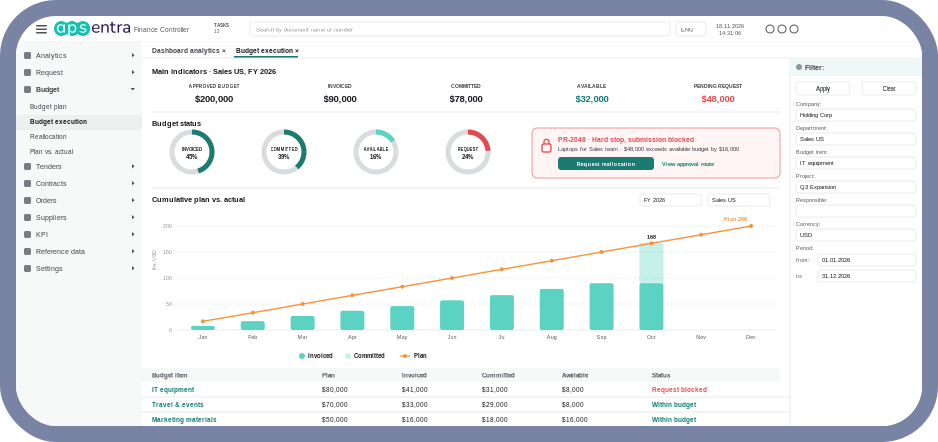
Budget check at submission

Routes that mirror your hierarchy

Approvals on web and mobile

Emergency requests

Hand-off to procurement


What changes for requesters, approvers, and finance

One place to ask

Decisions with context

Commitments from day one
High-speed implementation








Relevant cases






Connected across the source-to-pay cycle

Procurement Planning & Budget Control

Strategic Sourcing

Procure-to-Pay Automation

Business Spend Management

Contract Lifecycle Management

Supplier Management


Make procurement the easiest way to buy
Book a demo to see guided requests, budget checks, and approval routing configured for your own entities.
FAQs
What is intake management software?
Intake management software gives employees one structured way to request purchases. It captures what is needed, checks it against the budget, and routes it for approval before it reaches procurement.
How does APSentra route approvals?
Routes mirror your role hierarchy: departments, budget owners, and thresholds, with conditional approvers, quorum, and delegation. Your admins update routes as the structure changes, without an integrator.
What happens when a request exceeds the budget?
The request hits a hard stop and cannot be submitted. The requester reduces the amount or asks for a reallocation, which goes through its own governed approval.
Can intake work across multiple entities?
Yes. Each request belongs to a company and department, and budgets, rules, and routes apply per entity within one platform.
How does structured intake reduce maverick spend?
When the request form is easier than an email and every request is checked against the budget, purchases move into the governed channel. Spend outside it becomes visible and easier to address.
Does intake integrate with our ERP?
Yes. APSentra integrates with SAP, NetSuite, Microsoft Dynamics, Odoo, QuickBooks, and other systems through an open API, so budgets, requests, and orders stay in sync.
Can approvers act on mobile?
Yes. The APSentra mobile app covers tasks and approvals, so approvers keep requests moving without waiting for a desk. Notifications arrive as soon as a request needs action.