
Purchase Order Management Software | PO & Receiving | APSentra
Aps entra

Purchase order management software that keeps every order tied to contract, budget, and receipt

APSentra creates purchase orders from tenders and contract specifications at locked prices, routes them for approval, lets suppliers confirm on the portal, checks receiving line by line, and passes accepted quantities and prices to your ERP.

Follow a purchase order from contract to ERP

Click through an order in APSentra: created from a contract at a locked price, approved, confirmed by the supplier, received line by line, and passed to your ERP, in six steps.

Interactive walkthrough with illustrative data. Order stages, approval routes, required documents, and ERP fields are configured for each organization.

From orders in email to orders under control

Orders managed by email and spreadsheets
  • Orders retyped by hand from contracts
  • Prices adjusted at confirmation
  • Deliveries accepted in total, not by line
  • Short deliveries found at invoice time
APSentra
  • Orders created from tenders and contract specifications
  • Contract prices locked for the supplier
  • Item-level receiving with required reasons
  • Accepted quantity and price passed to the ERP

You can only pay correctly for what you received and approved.
Aps entra Aps entra

Core capabilities

Approval bottlenecks that slow the business icon

Orders from contracts and tenders

Orders are created from specification items or tender awards, with item, price, and budget plan line carried over.
Purchasing leverage lost as spend fragments icon

Prices locked for the supplier

On orders created from a tender or a specification, the supplier cannot change the price at confirmation.
End-to-end P2P visibility icon

Quantity and value control

Orders are checked against specification quantity, or against total contract value when quantity is not controlled.
Consolidated reporting at any scale icon

Configurable order stages

Draft, approval, supplier confirmation, final approval, fulfillment, acceptance, and completion, with routes per entity and order type.
Layers icon

Supplier confirmation on the portal

Suppliers confirm quantities, choose the delivery method, and follow every order in the supplier portal.
Intercompany procurement tracking icon

Delivery routes and receiving slots

Deliveries are planned by route and time slot, and batches with custom attributes are recorded on arrival.
Selection — AI procurement

Item-level receiving

Every line is accepted separately. Zero acceptance requires a reason, and an order cannot pass receiving without actual acceptance.
Competitive tendering: RFQ, RFP, and reverse auction icon

Extra approval for differences

When accepted quantity differs from confirmed, acceptance goes to a conditional approval before the order closes.
Send money — AI procurement

Documents, e-signature, and ERP sync

Required documents and e-signature by order type. Accepted quantity, price, cost, batches, and payment plan pass to the ERP via API.
Aps entra Aps entra

What changes for procurement, operations, and finance

Temporary lock icon

Orders that match the contract

Item, price, and volume come from the agreement, so buyers stop retyping terms and suppliers stop renegotiating them at confirmation.
Negotiating without performance data icon

Receiving you can trust

Depots and warehouses accept line by line, with reasons and documents, so short deliveries surface the day they happen.
Task icon

Payment based on what arrived

Finance receives accepted quantities, prices, and the payment plan, not totals copied from the original order.

High-speed implementation

Go live in 8 weeks
Aps entra
Aps entra Aps entra
1 Week
Consulting
Review existing business processes, define goals, KPIs, and savings potential.
Aps entra
Aps entra Aps entra
3 Weeks
Implementation & Automation
Configure APSentra, launch workflows, and begin tracking key procurement KPIs.
Aps entra
Aps entra Aps entra
3 Weeks
Integration
Integrate APSentra with your ERP, accounting, and analytics systems to ensure seamless data flow.
Aps entra
Aps entra Aps entra
1 Week
Learning
Turn procurement into a growth lever through certified courses and practical use cases.
Aps entra
Aps entra Aps entra
Ongoing
Control & Optimization
Monitor performance, ensure processes run smoothly – optimize where needed.

Why order problems surface too late

Control

Price at confirmation

Before
  • Suppliers adjust prices when confirming
After
  • Contract price locked on the order
Volume

Contract volumes

Before
  • Orders exceed contracted volume unnoticed
After
  • Orders checked against specification quantity
Receiving

Short deliveries

Before
  • Deliveries accepted in total
After
  • Each line accepted, with a reason for any difference
Approval

Quantity differences

Before
  • Discrepancies settled informally at the depot
After
  • Differences routed to an extra approval
Delivery

Depot scheduling

Before
  • Trucks arrive without notice
After
  • Deliveries booked to routes and receiving slots
Finance

ERP records

Before
  • ERP updated by hand from paper delivery notes
After
  • Accepted quantity, price, and cost passed via API
Aps entra Aps entra

Connected across the source-to-pay cycle

Selection — AI procurement

Procurement Planning & Budget Control

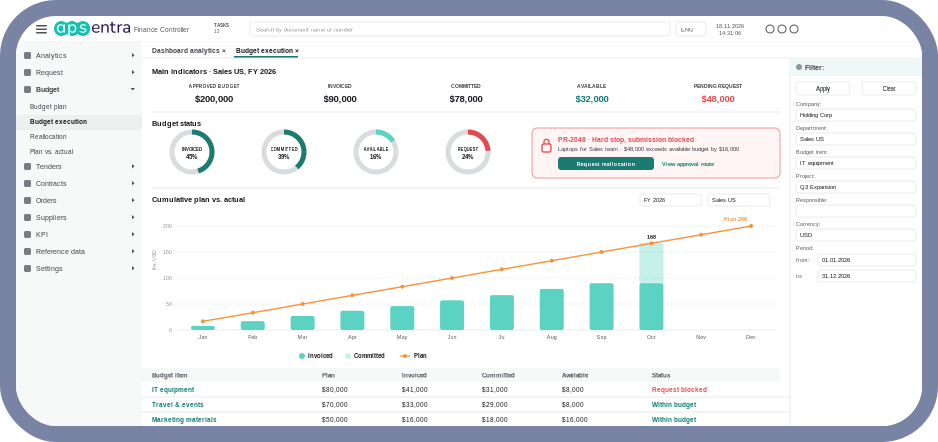
Every order sits on a budget plan line, so commitments are visible before the invoice.
Send money — AI procurement

Strategic Sourcing

Tender awards turn into orders at the winning price.
Budgeting — AI procurement

Contract Lifecycle Management

Specifications define what can be ordered, at which price and in what volume.
Expired certifications creating compliance exposure icon

Supplier Management

A setting keeps blocked suppliers out of new orders.
Temporary lock icon

Spend Management

Ordered and accepted amounts roll into actual and committed spend per budget line.
Supplier management, digital tendering and sourcing icon

Procurement Analytics

Order and price data feed the data cube and price dynamics reports.
Aps entra Aps entra

Keep every order tied to contract, budget, and receipt

Book a demo to see orders, supplier confirmation, and item-level receiving configured for your own entities and depots.
FAQs

01.

What is purchase order management software?

Purchase order management software creates, approves, and tracks purchase orders from issue to receipt. APSentra connects each order to its source contract or tender, its budget plan line, and its receiving record.

02.

Can orders be created from contracts?

Yes. Orders are created from contract specification items or tender awards. The item, price, and budget plan line come from the source document, and the supplier cannot change the price at confirmation.

03.

How does APSentra control contract volumes?

Orders are checked against the quantity in the contract specification. Where quantity is not controlled, orders are checked against the total contract value. An extending amendment holds new orders until it is approved.

04.

How does receiving work?

Receiving runs line by line. Each item gets an accepted quantity, zero acceptance requires a reason, and an order cannot pass receiving without actual acceptance. Required documents and e-signature can be set by order type.

05.

What happens when the delivered quantity differs?

When accepted quantity differs from confirmed, acceptance goes to an extra approval. The approver sees the reason, the batch, and the documents before the order closes.

06.

Which ERP systems does APSentra integrate with?

APSentra integrates with SAP, SAP Business One, NetSuite, Odoo, QuickBooks, Microsoft Dynamics 365 Business Central, and Dynamics NAV. Accepted quantity, price, cost, batch attributes, and payment plan data pass to the ERP through the REST API.

07.

Does APSentra cover invoices and payments?

Yes. Invoice registration and payment control run on the APSentra side, and the payment plan for each order is shared with your ERP.